Every way through a door, on one platform
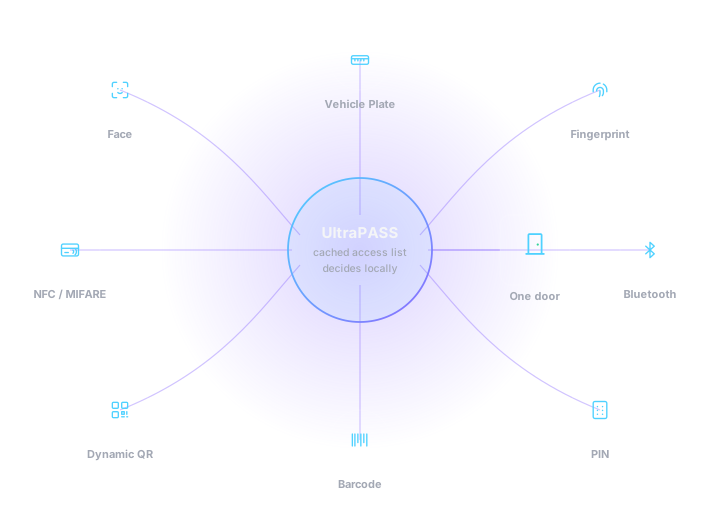
A face, a card, a phone, a rotating QR, a printed barcode, a fingerprint, a vehicle plate, a PIN. Eight credentials, one access list, one audit trail — and a reader that keeps deciding when the internet does not.
What makes this different
- One list
- Every credential type resolves to the same holder record and the same access list
- Offline first
- The reader decides locally; a network outage never locks anyone out
- Keep your cards
- MIFARE, HID and proximity encodings are configurable to match your existing estate
- One console
- Access control sits beside HVAC, lighting, energy and alarms — not in a separate silo
- Total control
- Relay timing, UID encoding, screen wording and branding are all pushed from the platform


Most buildings have four access systems and no answer
The car park has its own ANPR box with its own database. The lobby turnstiles run a card system from 2014. The lift has a separate controller nobody has the password to. Visitors are a paper book at the guardhouse. Nobody can answer “who is in the building right now?” without three logins and a phone call, and when somebody leaves the company, four different people have to remember to remove them.
xSERVA makes it one question with one answer
Every reader, at every door, barrier and lift lobby, works from the same access list against the same holder records. Issue a person a face, a card and a plate and they are still one person. Revoke them once and every door, gate and lift stops recognising them — including the ones that happen to be offline at that moment, because the revocation is already sitting on those readers.
Eight ways in, one decision engine
Each of these is a full page of detail, including the things that go wrong with it. Pick the credential that matches the consequence of the door, not the one that photographs best.
Face Recognition
Walk up, look up, walk through.On-device neural matching turns a face into a credential — no card to lose, no phone to unlock, nothing to hand over. Templates are stored as irreversible vectors, never as photographs.
Vehicle Plate Recognition
The car is the credential.AI number-plate recognition (ANPR) reads the plate as the vehicle approaches, checks it against the same access list every other channel uses, and lifts the barrier before the driver has to stop and wind a window down.
Biometric Access
A credential that cannot be lent.Fingerprint and palm-vein matching for the doors where you need to prove who came through, not just that a valid card did. Templates never leave the reader in a reversible form.
NFC, MIFARE & HID Cards
Keep the cards you already issued.A multi-format contactless reader that speaks 13.56 MHz MIFARE Classic and DESFire, HID iCLASS and Prox, and 125 kHz EM proximity — so an existing card estate migrates onto xSERVA without re-badging a single person.
Bluetooth & BLE
The phone stays in the pocket.Bluetooth Low Energy turns a phone into a proximity credential. The reader advertises, the phone answers with a rotating token, and the door opens without anything being taken out, unlocked or presented.
Dynamic QR Codes
A key that expires while you watch it.The holder portal mints a cryptographically signed QR code that rotates on a timer you set per site. A screenshot is worthless seconds later, and the reader verifies the signature itself — no network round trip at the door.
Barcodes & Static Passes
For everything already printed.The same optical scanner that reads dynamic QR also reads 1D barcodes and static codes, so printed visitor badges, event tickets, student cards and delivery manifests all work as credentials without new hardware.
PIN & Keypad
The fallback that always works.An on-screen keypad gives every door a credential that needs no card, no phone and no network. It is the backstop when a battery dies or a badge is left at home, and the second factor when a door needs two.
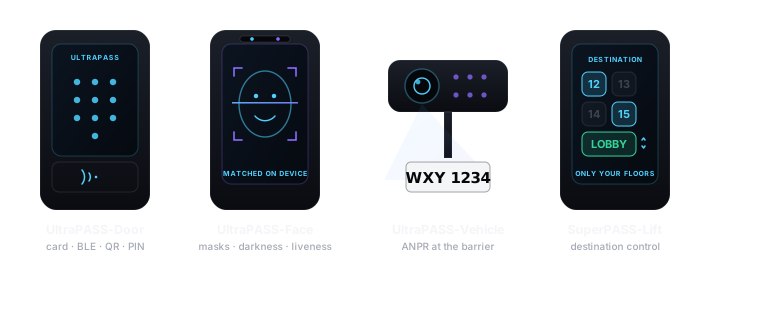
The UltraPASS and SuperPASS family
UltraPASS is what sits at the door or the barrier. SuperPASS is what gets built on top of it — lift destination control and visitor management. Both are administered from the same console and share one access list.
UltraPASS-Door
The multi-credential door panel. NFC and MIFARE, HID and proximity cards, BLE, dynamic QR, barcode and PIN in one unit, with the relay wired straight to the lock.
UltraPASS-Face
Face recognition at the door, matched on the device. Works with masks, works in the dark, and works with the internet down.
UltraPASS-Vehicle
AI plate recognition for barriers and gates. Reads the plate on approach and clears the vehicle against the same access list as every door.
UltraPASS-Bio
Fingerprint and palm-vein entry for the doors that need a non-transferable credential and a defensible audit trail.
SuperPASS-Lift
Destination control in the lift lobby. A scan or a tap calls the car and releases only the floors that holder is entitled to reach.
SuperPASS-Visitor
Visitor management from pre-registration to sign-out — a dynamic QR sent ahead by WhatsApp, a host notification on arrival, and an on-site roll call that is always current.

How a reader talks to the platform
The direction of the arrows is the whole design. A reader sits behind NAT on a DHCP lease in somebody else’s building — so it calls out, and nothing ever calls in.
The door does not need the internet
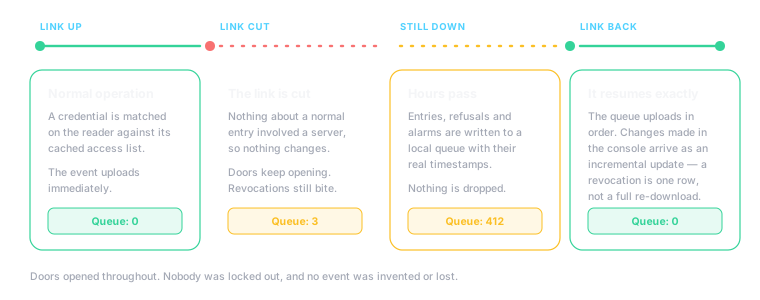
This is the single most important property of the system, and the one most likely to be glossed over in a sales meeting. Here is exactly what happens when the link drops.
The reader already has the list
Every panel holds its own copy of the credentials valid at its door. Nothing about a normal entry involves a server, so nothing about a normal entry can be broken by a server being unreachable.
Decisions carry on unchanged
Revocations, schedules, expiry and two-factor rules are all evaluated on the panel. An offboarded badge that was revoked yesterday is still refused today, mid-outage.
Events queue in order
Entries, refusals and alarms are written to a local queue with their real timestamps. Nothing is dropped and nothing is invented.
The link returns and it resumes exactly where it stopped
The queue uploads in order, and configuration changes made in the console during the outage arrive as an incremental update — a revocation is a single delete row, not a re-download of the whole access list.
Try it yourself
The interactive demo has a switch that cuts the network. Flip it and keep presenting credentials — the door keeps working, and the events change from “uploaded” to “queued”. Open the demo →

What managing this actually looks like
The readers are the visible part. The reason a portfolio manager sleeps at night is what sits behind them.
One Holder, Every Credential
A person is a holder record. Their face, card UID, PIN, QR entitlement and vehicle plate hang off that one record, so revoking access revokes all of it at once instead of five times in five places.
Site Hierarchy, Not Spreadsheets
Client, site, device. Access grants are made against sites and inherit downwards, which is what lets a portfolio manager give a regional contractor access to eleven buildings in one action.
Software Access Is Separate
Who may open a door and who may sign in to the console are deliberately two different systems. A security guard who opens every door should not be able to edit the access list, and the platform enforces that rather than trusting policy.
Schedules And Pass Types
Build a pass type once — "Contractor, weekdays 08:00–18:00, ground floor and plant room" — and issue it a hundred times. Change the template and every pass issued from it follows.
Events, Alarms And Audit
Every decision, every enrolment, every configuration change is written to an audit trail with who did it and when. Door events sit next to building alarms in the same console.
Total Device Configuration
Relay behaviour, unlock duration, card UID encoding, QR refresh, screen wording, branding and wallpaper are all set from the console and pushed to the panel. Nobody has to stand at a door with a laptop.
Where the intelligence actually is
Three places, each doing something specific. Everything else is ordinary software, and calling it AI would not make it better.
At the panel
Face matching, liveness detection and plate character recognition are neural models running on the reader’s own processor. They are the reason a face and a moving vehicle can be credentials at all, and they run without a network because inference is local.
Across the event stream
Patterns that a person will not notice in a log of forty thousand entries: a badge used at two buildings twenty minutes apart, a door held open every Thursday afternoon, a contractor pass being used well outside the work it was issued for.
Between access and the building
Because access control and building automation share one platform, entry data is occupancy data. Lighting and HVAC respond to who is actually in a zone rather than to a schedule written two years ago, and the energy model gets a real occupancy input instead of an assumption.

An access system is only as good as its own security
A platform that controls every door in a building is worth attacking. These are the structural choices that assume someone will try.
Signed Commands
Every instruction sent to a reader is signed and bound to that specific device with an expiry. A captured command replayed at a different door, or an hour later, is rejected.
Per-Site Keys
QR signing keys are held per site and stored encrypted. One site's compromise is not every site's compromise.
Irreversible Biometrics
Face and fingerprint enrolment produces a one-way feature vector. The source image is discarded and cannot be recovered from what is stored.
No Inbound Path To Readers
Readers call the platform; the platform never dials into a reader. There is no inbound port to expose, forward or forget to close, which removes an entire class of exposure.

What this looks like in your kind of building
Commercial Offices
Turnstiles that clear a morning peak on face or BLE, lift destination control that only offers the floors a person is entitled to, and contractor QR passes that expire on their own at 18:00.
Gated Communities
ANPR at the boom gate for residents, dynamic QR sent to a visitor by WhatsApp before they set off, and a guardhouse that stops copying plate numbers onto a clipboard.
Manufacturing & Warehousing
Face recognition that reads through a helmet visor, palm vein for hands that spend the shift in gloves, and barcode acceptance at the loading bay from the courier's own manifest.
Data Centres
Fingerprint plus PIN on the cage door, anti-passback so a badge cannot be handed back through a fence, and an audit trail that answers an auditor with a name rather than a card number.
Education & Campuses
Student cards that keep working because the reader speaks their existing MIFARE encoding, event barcodes for open days, and schedules that follow the timetable.
Mixed-Use Developments
One platform across retail, residential and office towers with a single site hierarchy, so a management company runs the whole estate from one console instead of four systems.

Replacing what is already there
Nobody replaces an access system because they want to. They do it because the old one cannot answer a question they now have to answer. The migration path is designed around that reluctance.
Keep the cards
Configure the reader to produce card numbers in the same format your existing database holds. The cards in people’s wallets keep working, and re-badging comes off the budget.
Move one door
Swap a single reader, enrol the holders who use it, and run it in parallel. There is no cutover weekend and no window where two systems are both half-authoritative.
Add channels as you go
Face, BLE and dynamic QR can be turned on for a subset of holders on a door that is already live, without touching anyone else.
Retire the old console last
When the final door is across, the legacy system is decommissioned rather than switched off in a panic. Its history can be kept as an archive.
Frequently asked questions
What is UltraPASS?
UltraPASS is the VYROX line of IoT access-control readers managed from xSERVA. One family of panels covers face recognition, AI vehicle plate recognition, fingerprint and palm-vein biometrics, NFC, MIFARE, HID and proximity cards, Bluetooth and BLE, dynamic QR codes, barcodes, and PIN entry.
What is the difference between UltraPASS and SuperPASS?
UltraPASS covers the readers at a door or a barrier — face, vehicle, biometric, and the multi-credential door panel. SuperPASS covers the access experiences built on top of them: lift destination control and visitor management. Both are administered from the same xSERVA console and share one access list.
Does the door still open if the internet goes down?
Yes. Every UltraPASS reader holds its own copy of the access list and makes the decision locally, so a cut link, a dead router or an ISP outage does not lock anyone out. Events queue on the reader and upload in order the moment the link returns.
Can I keep my existing access cards?
In most cases, yes. The reader speaks MIFARE Classic and DESFire, HID iCLASS and Prox, NTAG, and 125 kHz EM proximity, and the UID letter case, byte order and number base are all configurable — so xSERVA can be told to store card numbers exactly the way your previous system did. Existing cards then keep working without re-badging anyone.
How do dynamic QR codes stay secure?
Each code is cryptographically signed with a key held per site, and it rotates on an interval you set. The reader verifies the signature itself without needing the network, and refuses a code it has already seen. A screenshot passed to someone else is dead within seconds.
Where are face and fingerprint templates stored?
On the reader, as irreversible feature vectors. The original photograph or ridge image is discarded after enrolment, and the stored template cannot be turned back into a face or a fingerprint. Matching happens on the device, so biometric data does not travel to the cloud on every entry.
Can one person hold more than one type of credential?
Yes, and most do. A single holder record can carry a face, a card, a PIN, a dynamic QR and a vehicle plate at the same time. Every one of them resolves to the same person, so the audit trail reads as one identity rather than five unrelated credentials.
Does access control run on the same platform as building automation?
It does. Access control, HVAC, lighting, energy and alarms all sit in one xSERVA console against one site hierarchy, which is what lets a door event drive a lighting scene or an occupancy figure feed the energy model.
Put a credential to a reader and see
The interactive lab takes about two minutes and answers more questions than a brochure. Then talk to Patrick about your doors.