PIN & Keypad
The fallback that always works.
An on-screen keypad gives every door a credential that needs no card, no phone and no network. It is the backstop when a battery dies or a badge is left at home, and the second factor when a door needs two.
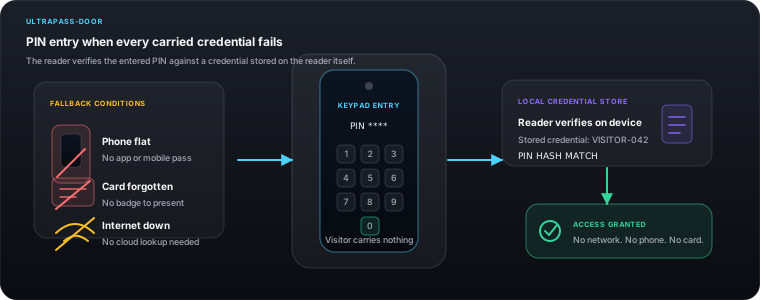

Every other credential on this site can fail in a way that is nobody's fault — a flat phone, a card left in a coat, a cut finger, a plate obscured by a bike rack. A PIN is the floor beneath all of them.
How it works
The detail that decides whether this survives contact with a real building.
- Length
- Configurable digit length with a per-door minimum
- Second factor
- Require card-then-PIN or face-then-PIN on nominated doors
- Lockout
- Repeated wrong entries lock the panel and raise an event
- Duress
- A duress PIN opens the door and silently alerts the console
- Idle screen
- The keypad can be the panel idle screen, or hidden behind a tap

The backstop on every panel
The on-screen keypad is available on every UltraPASS door reader, so no site is ever one dead battery away from a lockout. It needs no card, no phone and no network.
The second half of two-factor
On the doors that warrant it, require card-then-PIN or face-then-PIN. The panel holds the first factor, waits, and releases only when both have been given. This is set per door, because almost no building needs it everywhere.
A duress PIN
A separate PIN opens the door exactly as normal while raising a silent alarm at the console. Under coercion the correct outcome is compliance at the doorway and an alert somewhere else.
Lockout on repeated failures
Consecutive wrong entries lock the panel for a configurable period and raise an event. This is what makes a short PIN survivable — guessing has a cost.
The keypad can be the idle screen
On back-of-house doors where PIN is the primary method, the keypad is what the panel shows at rest. On doors where it is a fallback, it sits one tap away so it does not invite use.
Length is yours to set
Longer PINs on higher-value doors, shorter ones where the PIN is a second factor behind a card. The minimum is enforced per door rather than assumed site-wide.
Where this fits
Back-of-house doors, second-factor pairing, and a fallback on every reader.
Because every channel resolves to the same holder record, this does not have to be the only way in. A person can hold this alongside a card, a PIN and a plate, and the audit trail still reads as one identity.
Questions about pin & keypad
How long should a PIN be?
Longer where the PIN is the only credential, shorter where it is the second factor behind a card or a face. The minimum length is enforced per door, and repeated failures lock the panel, which is what makes a shorter second-factor PIN acceptable.
What happens if someone keeps guessing?
After a configurable number of consecutive failures the panel locks for a set period and raises an event in the console.
Can a PIN be used as a second factor?
Yes, and this is its most common use on higher-value doors — card-then-PIN or face-then-PIN, configured per door.
Is there a duress option?
Yes. A designated duress PIN opens the door normally while sending a silent alert to the console.
The other ways in
One access list, one console, one audit trail — whichever of these a person happens to be carrying.
Face Recognition
Walk up, look up, walk through.
UltraPASS-VehicleVehicle Plate Recognition
The car is the credential.
UltraPASS-BioBiometric Access
A credential that cannot be lent.
UltraPASS-DoorNFC, MIFARE & HID Cards
Keep the cards you already issued.
UltraPASS-DoorBluetooth & BLE
The phone stays in the pocket.
UltraPASS-DoorDynamic QR Codes
A key that expires while you watch it.
UltraPASS-DoorBarcodes & Static Passes
For everything already printed.