Try the reader before you book the demo
This is a working model of an UltraPASS door panel. Pick a holder, present a credential, and watch the decision engine explain itself. Then break things: cut the network, move the clock to three in the morning, turn on two-factor, and see what the door does.

1. Choose who is at the door
Each holder carries a different set of enrolled credentials, which is exactly how a real access list looks.
2. Present a credential
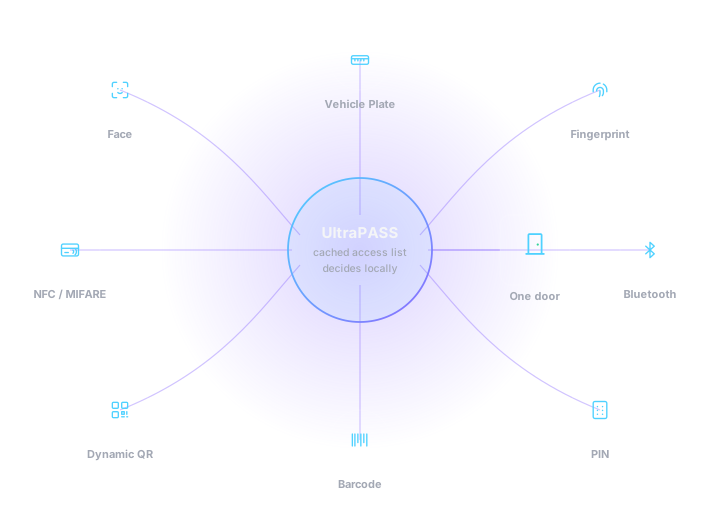
One panel, eight ways in. A credential the holder has not been issued is refused as unrecognised, not as a system error.
3. Break something
These are the three conditions that separate a system that works in a brochure from one that works in a building.
Live event log
This simulator runs entirely in your browser against a scripted access list. It reproduces the decision order a real UltraPASS reader uses — revocation, then enrolment, then schedule, then second factor — but it is not connected to hardware. To see the same logic run on a physical panel, book a live demo.
A key that expires while you are looking at it
The holder portal mints a signed code and rotates it on an interval set per site. Change the interval below and watch the ring. A screenshot of any of these is worthless the moment the ring runs out.
Refresh interval
In the product this is a per-site setting, validated against what the readers at that site will accept — set it too long and a stale code opens a door, set it too short and a phone shows a code that is already dead.
Why the reader does not phone home
Each code carries a signature made with a key held per site. The reader holds that key too, so it verifies the code by itself in a few milliseconds. No round trip, no latency at the door, and no dependency on the visitor’s mobile signal at the moment they scan.
The symbol above is drawn from a rotating token to show the rotation and countdown behaviour. Codes issued by the live holder portal are fully scannable and cryptographically signed.
What the reader did, in order
Every decision above follows the same four checks. They run on the panel, in this sequence, whether or not there is a network.
Is this pass revoked?
Revocation arrives at the reader as its own change row and is held locally. An offboarded badge stops working at the door even if the building has been offline for a week.
Is this credential enrolled against a holder?
The reader resolves the face, UID, token or plate to a person. If nothing matches, it says so plainly rather than reporting a fault.
Is that holder permitted here, now?
Site, door and schedule are all checked against the cached list. A contractor with a weekday window is refused at three in the morning and the refusal is logged with its reason.
Does this door need a second factor?
If it does, the panel holds the first factor and waits for the PIN. If the PIN never comes, nothing opens and the partial attempt is still recorded.
Frequently asked
What is UltraPASS?
UltraPASS is the VYROX line of IoT access-control readers managed from xSERVA. One family of panels covers face recognition, AI vehicle plate recognition, fingerprint and palm-vein biometrics, NFC, MIFARE, HID and proximity cards, Bluetooth and BLE, dynamic QR codes, barcodes, and PIN entry.
What is the difference between UltraPASS and SuperPASS?
UltraPASS covers the readers at a door or a barrier — face, vehicle, biometric, and the multi-credential door panel. SuperPASS covers the access experiences built on top of them: lift destination control and visitor management. Both are administered from the same xSERVA console and share one access list.
Does the door still open if the internet goes down?
Yes. Every UltraPASS reader holds its own copy of the access list and makes the decision locally, so a cut link, a dead router or an ISP outage does not lock anyone out. Events queue on the reader and upload in order the moment the link returns.
Can I keep my existing access cards?
In most cases, yes. The reader speaks MIFARE Classic and DESFire, HID iCLASS and Prox, NTAG, and 125 kHz EM proximity, and the UID letter case, byte order and number base are all configurable — so xSERVA can be told to store card numbers exactly the way your previous system did. Existing cards then keep working without re-badging anyone.