Face Recognition
Walk up, look up, walk through.
On-device neural matching turns a face into a credential — no card to lose, no phone to unlock, nothing to hand over. Templates are stored as irreversible vectors, never as photographs.

A face is the only credential nobody forgets at home, lends to a colleague, or leaves in the pocket of yesterday's jacket. That is the whole argument for it — and also the reason it has to be handled with more care than a plastic card.
How it works
The detail that decides whether this survives contact with a real building.
- Matching
- Runs on the reader, not in the cloud — a cut internet link does not stop the door
- Liveness
- Passive anti-spoofing rejects a printed photo or a screen replay
- Masks
- Matches on the periocular region, so a mask or a helmet visor is not a blocker
- Enrolment
- One capture from the console, or self-enrolment from the holder portal
- Privacy
- Stores a one-way template. The original image is discarded after enrolment

Matching happens on the panel
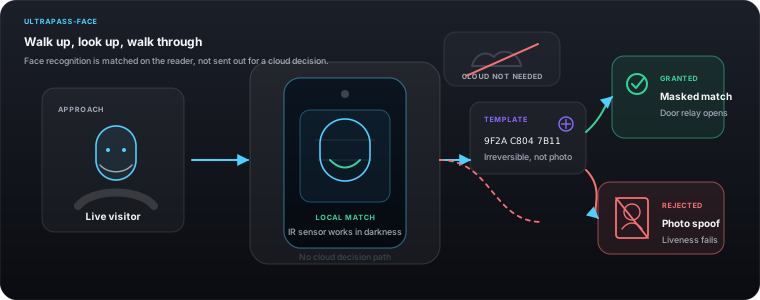
The neural match runs on the reader's own processor against templates it already holds. No frame of video is sent anywhere to open a door. That keeps entry under half a second, and it means a severed fibre or a failed router changes nothing about whether the door opens.
It works with a mask on
The model weights the periocular region — the area around the eyes — heavily enough that a surgical mask, a helmet visor or a scarf does not defeat it. This stopped being a pandemic feature and became a food-processing, clean-room and construction-site feature.
It works in the dark
Infrared illumination and a near-IR sensor path mean the reader does not depend on the corridor lighting being on. A lobby at 3am and a lobby at midday present the same problem to it.
A photo does not open the door
Passive liveness detection looks for the depth and micro-texture cues a printed photograph and a phone screen cannot produce. There is no extra step for the person walking up — they do not blink on command or turn their head.
The template is not a photograph
Enrolment produces a feature vector and discards the image. The vector cannot be reversed into a face. If a reader were physically stolen, what is on it is a list of numbers, not a staff photo album.
Consent and deletion are first-class
Enrolment is recorded with who authorised it and when. Deleting a holder deletes their template from every reader that holds it, and the deletion is itself an audited event — which is what a privacy officer will actually ask you to demonstrate.
Where this fits
Staff entrances, lobbies, lift lobbies, and any door where hands are usually full.
Because every channel resolves to the same holder record, this does not have to be the only way in. A person can hold this alongside a card, a PIN and a plate, and the audit trail still reads as one identity.
Questions about face recognition
Is face recognition data sent to the cloud?
No. Templates are stored on the reader and matching runs on the reader. The console holds the holder record and the enrolment audit, but the biometric match itself never leaves the device.
Can someone open the door with a photo of me?
No. Passive liveness detection rejects printed photos and screen replays by looking for depth and texture cues a flat image cannot reproduce.
What happens if the person is wearing a mask?
It still matches. The model relies heavily on the region around the eyes, so masks, visors and scarves are not a blocker.
How do I delete someone's face template?
Remove the credential from their holder record in the xSERVA console. The deletion propagates to every reader that held it, and the removal is written to the audit trail.
The other ways in
One access list, one console, one audit trail — whichever of these a person happens to be carrying.
Vehicle Plate Recognition
The car is the credential.
UltraPASS-BioBiometric Access
A credential that cannot be lent.
UltraPASS-DoorNFC, MIFARE & HID Cards
Keep the cards you already issued.
UltraPASS-DoorBluetooth & BLE
The phone stays in the pocket.
UltraPASS-DoorDynamic QR Codes
A key that expires while you watch it.
UltraPASS-DoorBarcodes & Static Passes
For everything already printed.
UltraPASS-DoorPIN & Keypad
The fallback that always works.